
Customers and branches
Register stores, addresses and contacts. Add coordinates to locate destinations on the map.
Connect your warehouse and delivery operation. Organize supermarket and store orders, reserve goods, assign a vehicle and record complete, partial or rejected deliveries.
Public demo without registration. Clients: sign in to the application.
 Explore the product
The common problemOrders by message, stock promised twice and differences found after delivery rounds.
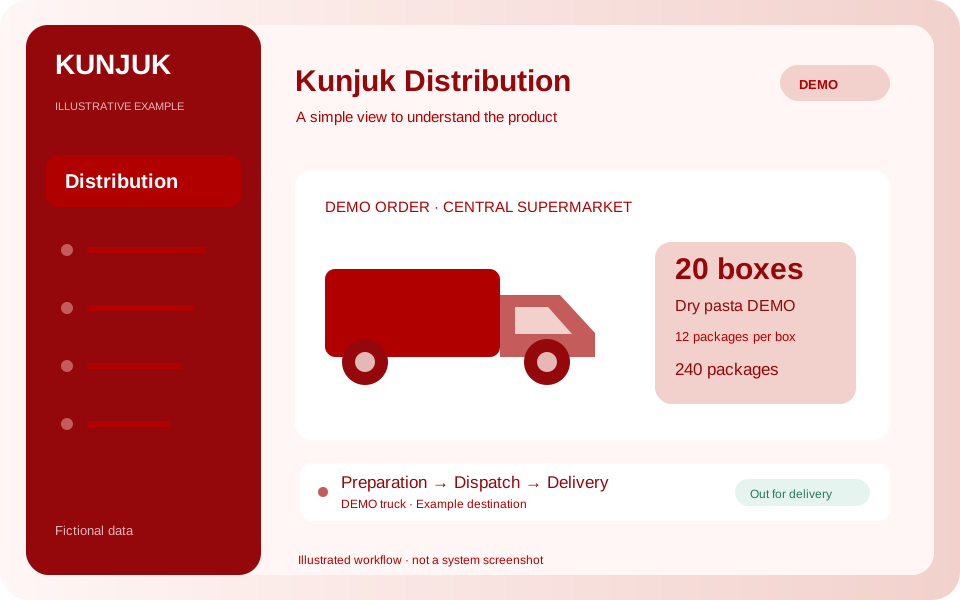
With Kunjuk DistributionA supermarket orders twenty boxes of pasta. The warehouse prepares and dispatches twenty; the customer receives fifteen. The remaining five await return until the warehouse receives them.
Who it is forFood, cleaning-product, spare-part and supply distributors with warehouses and deliveries.
The order connects those preparing goods with those delivering them. Each team knows the next step and differences are recorded.
Discover how it works: DistributionRegister stores, addresses and contacts. Add coordinates to locate destinations on the map.
Reserve warehouse stock using each product’s unit: boxes, units, liters and other measures.
Confirm preparation and assign a vehicle, responsible person, route and stop. Dispatch creates Inventory issues.
The area manager views assigned orders and records actual quantities, recipient and reasons for partial or rejected deliveries.
Undelivered goods remain pending return. Administration confirms receipt and returns suitable goods to stock.
Search and filter orders, open their history, explore statuses in charts and download tables in Excel or CSV.
An initial version connected to Inventory. Responsible users use the department profile and see assigned orders within their department. The map shows recorded destinations; it does not include GPS tracking or route optimization. This stage does not include invoicing, collections, price lists, batches, expiration dates, delivery photos or electronic signatures. To change order products, cancel the reservation and create the correct order before dispatch.
A public simulation with no registration or changes to customer data. Follow twenty boxes of pasta from warehouse to supermarket.
Coast Route DEMO · Truck 01 · Fictional driver. Fictional product: Dry Pasta DEMO, SKU FID-001. Each box contains twelve 500 g packages; 20 boxes equal 240 packages.
Reservations prevent promising the same goods to two orders. Physical stock is deducted at dispatch. Undelivered products return to stock when their arrival at the warehouse in suitable condition is confirmed.
The supermarket ordered twenty boxes. They are reserved and ready for preparation.
Enable the applications you need according to your package. Each organization keeps separate data, users and permissions.
Customize access with your logo and colors. You can also request a custom domain. We help define scope, implementation and access.
Explore the other applicationsTell us what you need to organize. We review the workflow together and define applications, implementation, training and support in a proposal.
Start with the tools your organization needs and expand later. Scope and conditions are defined in the commercial proposal.
Illustrative examples and public demos use fictional data. The interactive demo is a guided simulation of features without access to panel data.
Access depends on roles and permissions. A personalized demonstration reviews what each member should record, approve or view.