
Vehicles and departments
Identify vehicles and equipment by plate or internal code, using your organization’s names and groups.
Your business or municipality defines which vehicle can refuel, where and up to how many liters. The station attendant checks authorization and records the actual fuel supplied. If the station does not use the system, the administrator records the receipts afterward.
Public demo without registration. Clients: sign in to the application.
 Explore the product
The common problemAuthorizations by message and uncertainty over which vehicle can fill at each station.
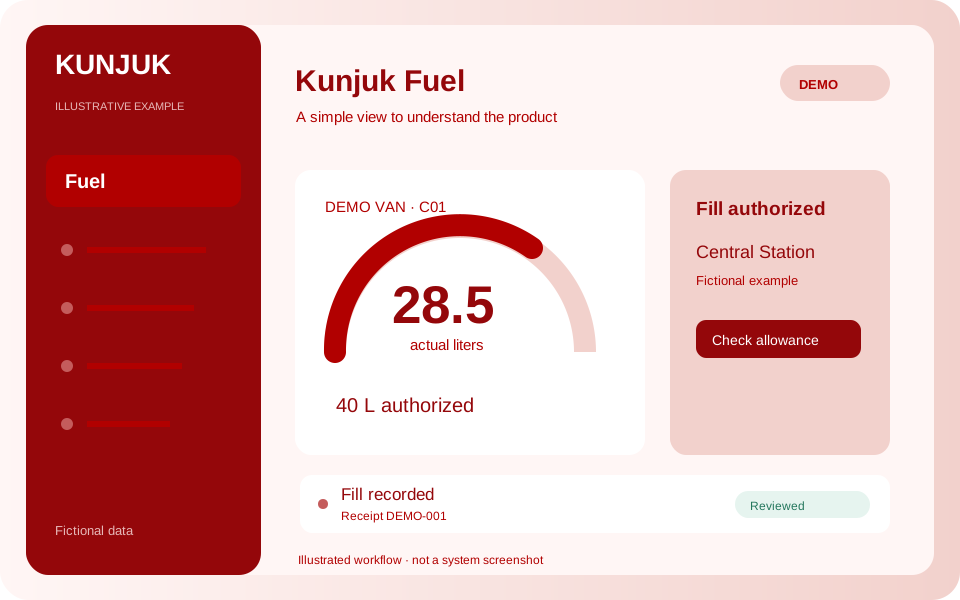
With Kunjuk FuelA van has 40 liters authorized. The attendant checks the plate and records 28.5 actual liters. If the station does not use Kunjuk, the administrator may record the ticket later. Each fill is entered once.
Who it is forAdministration, fleet managers and station users.
The organization authorizes the allowance and the station records the actual fill. If it does not use the system, the administrator receives and records tickets. A clear workflow for the people doing the work every day.
Discover how it works: FuelIdentify vehicles and equipment by plate or internal code, using your organization’s names and groups.
Enable one or more branches according to each vehicle’s area, including different brands.
Define one-time, daily or weekly fills, allowed days and limits per fill or period.
The operator searches for the plate or internal ID, views the authorization valid for that station and records actual liters within the available maximum.
Record the actual date, liters, station and receipt number. Attach a photo and transcribe tickets received days later.
Review observations by station, day, allowance or possible duplicate. A difference requires review; it does not prove wrongdoing.
Review records and download CSV. Cancellations preserve the original operation, reason and responsible user.
Two recording workflows are available: authorized station users, or an administrator entering receipts supplied by drivers. Both use the authorization allowance; each refueling must be recorded only once. The administrative workflow does not require station attendants or drivers to have accounts. Actual liters are recorded even when below the maximum. The pilot does not include OCR, pump integration, pricing or invoicing.
The administrator defines vehicles, departments, fuel, allowances, enabled days and permitted stations.
If the station uses Kunjuk, the attendant searches by plate or internal ID and sees the authorization, fuel and maximum available at that station.
The attendant records actual liters; otherwise the driver delivers a ticket for the administrator to enter. Fills can be smaller than the authorized maximum.
The organization reviews how much, when and where fuel was filled, fills used and available allowance.
Public demo with fictional data. Choose who records the fill and follow an authorization through the workflow. No action changes the real panel.
The business or municipality decides the authorization. Actual liters are recorded even when less than the maximum is filled.
Set the vehicle, station, fuel and maximum allowed. Station accounts view their applicable current authorizations.
Enable the applications you need according to your package. Each organization keeps separate data, users and permissions.
Customize access with your logo and colors. You can also request a custom domain. We help define scope, implementation and access.
Explore the other applicationsTell us what you need to organize. We review the workflow together and define applications, implementation, training and support in a proposal.
Start with the tools your organization needs and expand later. Scope and conditions are defined in the commercial proposal.
Illustrative examples and public demos use fictional data. The interactive demo is a guided simulation of features without access to panel data.
Access depends on roles and permissions. A personalized demonstration reviews what each member should record, approve or view.